HomeBuddy
HomeBuddy is a fast, privacy-first voice companion for Home Assistant, bringing together your iPhone, Apple Watch, G1 smart glasses, Halliday glasses, and smart ring so you can control lights, switches, sensors, and more from the wearables you already use every day.
Description
HomeBuddy is an intuitive, voice-powered companion for managing your smart home through the open-source Home Assistant platform. Control lights, switches, sensors, cameras, and more with natural voice commands from your iPhone, Apple Watch, G1 smart glasses, or Halliday glasses. Designed for speed and simplicity, HomeBuddy can process voice commands locally or through your own Home Assistant setup, with no cloud AI required. HomeBuddy also supports the Captions (Translate) feature on both G1 and Halliday glasses through the Soniox platform, adding live transcription and translation support right from your glasses experience. On Halliday glasses, HomeBuddy also supports offline glasses commands, so users can save voice-triggered actions for settings like Headphones Mode, Silent Mode, Low Power Mode, Mute Mode, Brightness, Volume, and quick transcription or translation workflows. On Halliday glasses, HomeBuddy can also support features like Cheatsheet and Audio Memo for quick reference and hands-free note capture. On G1 glasses, HomeBuddy supports Teleprompt for glanceable reading and guided prompts right in view, along with improved dashboard status and battery visibility. For even faster control, HomeBuddy supports smart ring touch actions that users can customize inside the app. A single tap can trigger the AI on the glasses or wake the glasses so they are ready to listen for offline commands that control Home Assistant devices. By connecting your wearable devices together, HomeBuddy helps you control your home in a more natural, always-ready way without distractions, accounts, or lock-in.
What’s New in 3.0.0
- Your voice. Your commands.
- Introducing Voice Profiles.
- Voice Profiles let HomeBuddy recognize your voice on Halliday Glasses, Apple Watch, and G1 Glasses for a more personal and secure experience.
Get the app
See HomeBuddy in Action
Explore HomeBuddy across iPhone, Apple Watch, G1 glasses, and Halliday glasses, with each experience designed for fast, glanceable smart home control.
iOS App
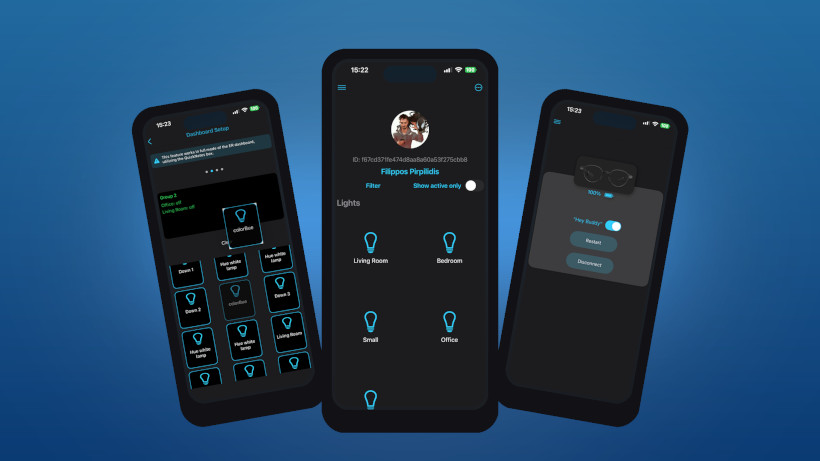
Manage your Home Assistant setup from iPhone with a clean interface built for speed, customization, and quick access to your devices.
View entity states at a glance, launch controls faster, and keep your wearable devices connected from one place.
Set up smart ring touch actions, manage glasses features, and trigger commands across your home with a single app.


Smart Ring
HomeBuddy supports smart ring touch controls, giving you a fast and discreet way to trigger actions without reaching for your phone.
Users can set up custom ring gestures inside the app and choose what each touch action should do.
A single tap can trigger the AI on the glasses or wake the glasses so they are ready to listen for offline Home Assistant commands.


G1 Glasses
Use HomeBuddy on G1 glasses for hands-free smart home control with quick voice access right from your view.
Captions (Translate) uses the Soniox platform to support live transcription and translation on G1 glasses.
Teleprompt sends to the glasses the text the user writes in the app. With auto-enable, the text scrolls on the glasses as the user speaks, moving forward once a word or sentence is completed. Offline commands also let you control Home Assistant devices directly from the glasses, while the updated G1 dashboard makes connection and battery status easier to understand at a glance.


Halliday Glasses
HomeBuddy extends the glasses experience to Halliday with wearable controls built for smart home access and everyday assistance.
Captions (Translate) on Halliday uses the Soniox platform for transcription and translation support right on the glasses.
Offline Commands for Glasses let users store custom Halliday voice phrases and trigger supported glasses actions such as Headphones Mode, Silent Mode, Low Power Mode, Mute Mode, Brightness, Volume, Transcribe, and Translate directly from the glasses.
Cheatsheet lets the user write text in the mobile app and view it on the Halliday glasses through DigiWindow. Audio Memo lets the user keep a quick voice note from the glasses, stores the audio in the app, and gives the user the ability to generate text from that recording.


Apple Watch
Fast control, no phone needed. Get instant access to your home from your wrist with quick actions designed for everyday use.
Tap to toggle devices, use hold-and-speak actions, and keep essential controls ready from a compact watch interface.
HomeBuddy is optimized for watchOS with a simple layout that keeps smart home actions fast and easy to reach.


Privacy Policy
Effective Date: May 2, 2025.HomeBuddy does not collect, store, or share any personal data. The app operates using local processing and communicates with your self-hosted Home Assistant instance. No accounts are required, and no user-identifiable information is sent to any external servers by default. If you enable optional integrations such as Soniox, data used for transcription or translation may be sent to Soniox's servers for processing, subject to Soniox's privacy policy. This feature is entirely optional and disabled by default. HomeBuddy does not collect analytics, track user behavior, or share data with third parties. If you have any questions about this policy, feel free to contact us at: f.pirpilidis@gmail.com